Qwen3.8 27B: Specs, Memory Requirements, and How to Run It

Qwen3.8-27B is Qwen's 27-billion-parameter dense model for text, images, and video. The 3.8 identifies the model generation; 27B identifies its parameter scale. If you searched for "Qwen 3.8B," use the exact checkpoint name Qwen/Qwen3.8-27B when downloading this model.
With Ollama installed (opens in a new tab), the quickest local entry point is:
ollama run qwen3.8:27bThat command downloads the model on first use. The Ollama listing (opens in a new tab) showed an 18 GB package when checked on October 14, 2026. Allow additional memory for the context, runtime, and operating system. A download size is not a RAM requirement.
This guide helps you choose a runtime, make a small first request, and avoid treating the full context window as a sensible starting setting.
Sources checked October 14, 2026. We verified the official model metadata, command references, Python syntax, and page rendering. We did not run Qwen3.8-27B inference or measure its speed, accuracy, or GPU memory. Deployment instructions below follow the linked runtime documentation.
- Qwen3.8 27B: Specs, Memory Requirements, and How to Run It
- Haiku pricing: Haiku 5.5 vs 4.5 vs GPT-6 Luna
- Python 3.15 Upgrade Guide: Install with uv, Use Lazy Imports, and Check Your Data Stack
- Claude Code Mods Tutorial: Build and Test Your First Mod, Plus 15 Community Examples
- How to Use Pi Coding Agent 1.0: Install, Connect a Model, and Run Your First Task
- How to Use Laya: Classify Text in a pandas DataFrame with the Open-Source Jev Alternative
- Claude Code Reads AGENTS.md Now: Setup, Loading Modes, and Sharing One File with Codex, OpenCode, and Cursor
- How to View Deleted Reddit Posts (2026 Guide): 5 Ways That Still Work
- GPT Image 2.5: How to Use It, Flare vs Sunburst, and API Pricing
- How to Use DeepSeek Harness: Install, Set Up, and Run Your First Agent
- Runcell Science: An Open Source Alternative to Claude Science for Research Workflows
- How to Make Mac Not Sleep: Keep Codex, Claude Code, and AI Agents Running
- OpenClaw vs ZeroClaw vs Pi Agent vs Nanobot: Which AI Agent Stack Should You Choose in 2026?
- Can Claude Code Analyze Jupyter Notebooks for Data Science? What It Actually Does
- Claude Code Routines: Why AI Agent Cron Jobs Matter
- Claude Code Desktop Bypass Permissions: How to Enable It
- How to Build Two Python Agents with Google’s A2A Protocol - Step by Step Tutorial
- Top 10 growing data visualization libraries in Python in 2025
What the model name and specs mean
The official Qwen model card (opens in a new tab) identifies a dense vision-language checkpoint with native 262,144-token context and an extension path up to 1,000,000 tokens. It builds on the Qwen3.5 architecture. Its configuration (opens in a new tab) therefore uses Qwen3_5ForConditionalGeneration and model_type: qwen3_5; those fields do not mean you downloaded the wrong generation.
| Check | Qwen3.8-27B | What to do with it |
|---|---|---|
| Official checkpoint | Qwen/Qwen3.8-27B | Copy the complete ID into a supported server |
| Architecture | Dense, with a vision encoder | Budget for the full model rather than a small active-expert count |
| Inputs | Text, images, video | Check that your runtime and package support the input you need |
| Native context | 262,144 tokens | Start with a smaller runtime context and raise it when needed |
| Thinking | Enabled by default | Choose thinking behavior explicitly for your task |
| License | Apache-2.0 | Check the exact checkpoint or derivative you distribute |
Qwen3.8-27B is a separate checkpoint from Qwen3-VL. Existing Qwen3-VL benchmarks should not be treated as measurements of this model.
How much RAM or VRAM does Qwen3.8 27B need?
There is no single number without specifying the precision, runtime, context length, and workload. Start with weight storage, then leave room for everything used during inference.
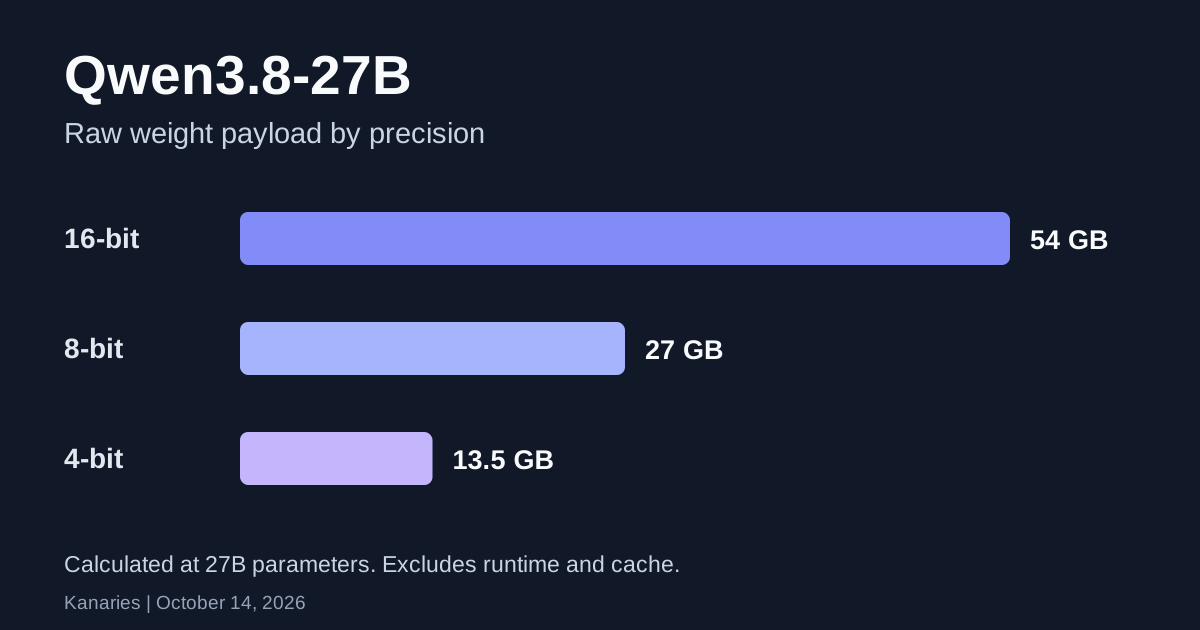
The calculation below uses the advertised 27B parameter scale and decimal GB. It excludes quantization metadata, mixed-precision layers, vision components, caches, and runtime allocations.
| Weight precision | Calculation | Approximate raw weight payload |
|---|---|---|
| 16-bit | 27 billion × 2 bytes | 54 GB |
| 8-bit | 27 billion × 1 byte | 27 GB |
| 4-bit | 27 billion × 0.5 bytes | 13.5 GB |
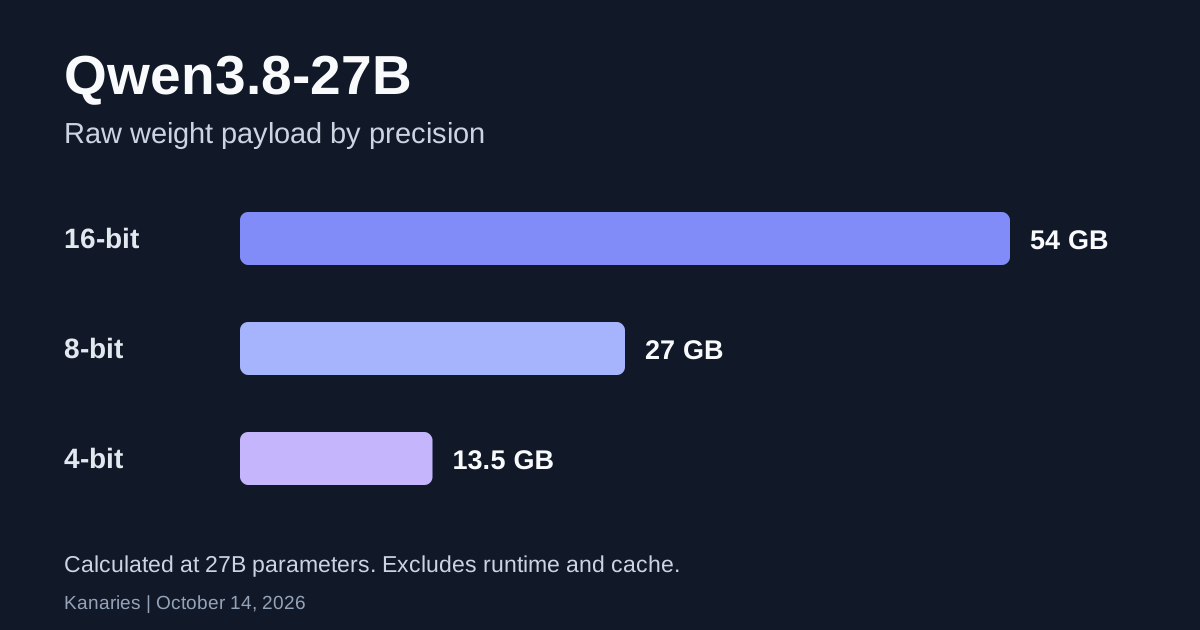
Real packages can exceed that lower-bound calculation. The current 18 GB Ollama download is one example. A quantized package also need not have the same output quality as the original checkpoint.
For a first attempt, keep the prompt short, set a modest context, and send one request at a time. On a Mac, unified memory also serves the operating system and other apps. On a GPU server, distinguish system RAM from GPU VRAM. CPU offloading may let a model load while making responses slow.
After a request, run ollama ps. Its PROCESSOR column reports whether the model uses GPU memory, CPU memory, or a mixture. See Ollama's memory check (opens in a new tab).
Run a small local request with Ollama
Install or update Ollama using the official download (opens in a new tab). Then download the model and inspect the package:
ollama pull qwen3.8:27b
ollama show qwen3.8:27b
Start the chat after the download completes:
ollama run qwen3.8:27bInside that chat, set an 8,192-token context before sending a small prompt:
/set parameter num_ctx 8192
Write a Python function that counts missing values in each column of a pandas DataFrame.
The native model limit and this runtime setting are different. The smaller setting is a starting budget, not a claim that the model supports only 8K tokens.
For scripts, Ollama serves a local HTTP API on port 11434. This request disables streaming and bounds the output:
curl --fail-with-body http://localhost:11434/api/chat \
  -H 'Content-Type: application/json' \
  -d '{
    "model": "qwen3.8:27b",
    "messages": [
      {"role": "user", "content": "Write a Python function to count missing values by DataFrame column."}
    ],
    "stream": false,
    "think": false,
    "options": {"num_ctx": 8192, "num_predict": 512}
  }'
The final answer is in message.content. Ollama's chat API (opens in a new tab) documents the response and token timing fields. If your package rejects the thinking setting, inspect its supported values through /api/show as described in Ollama's thinking documentation (opens in a new tab).
This Python version uses the standard library and needs no API key:
import json
from urllib.request import Request, urlopen

payload = {
    "model": "qwen3.8:27b",
    "messages": [{
        "role": "user",
        "content": "Write a Python function to count missing values by DataFrame column.",
    }],
    "stream": False,
    "think": False,
    "options": {"num_ctx": 8192, "num_predict": 512},
}
request = Request(
    "http://localhost:11434/api/chat",
    data=json.dumps(payload).encode("utf-8"),
    headers={"Content-Type": "application/json"},
    method="POST",
)
with urlopen(request, timeout=300) as response:
    result = json.load(response)
print(result["message"]["content"])
Read and test generated code before using it on your data. Keep a tiny DataFrame with known missing-value counts as an acceptance check. For the underlying operation, see handling missing values in pandas.
Use vLLM or SGLang on a GPU server
Use the current vLLM Qwen3.8-27B recipe (opens in a new tab) or SGLang cookbook (opens in a new tab). Their hardware and precision requirements differ. An NVFP4 checkpoint needs a runtime and device that support that precision.
One example from the vLLM recipe targets a single RTX 5090 with an NVFP4 derivative. It uses a 32K context and eager execution:
vllm serve Inferact/Qwen3.8-27B-NVFP4 \
  --tensor-parallel-size 1 \
  --max-model-len 32768 \
  --kv-cache-dtype fp8 \
  --enforce-eager \
  --reasoning-parser qwen3
This comes from vLLM's published recipe, not a Kanaries hardware test. Match your installed vLLM version, hardware, and quantization to that recipe. It records a CUDA graph memory failure on this setup and uses --enforce-eager to avoid it. The flag changes execution behavior; it does not shrink the weights.
The Qwen card also provides an OpenAI-compatible API example for supported serving engines. A hosted provider may expose a different model ID and thinking parameter structure. Use its exact settings rather than copying a local request unchanged.
Control thinking before comparing speed
Qwen documents xhigh, medium, and low reasoning effort, with xhigh as the default, plus preserved thinking across conversation history. Check which controls your endpoint exposes. Ollama's think field and a hosted server's reasoning_effort are different API interfaces.
| Task | Starting approach | Check before accepting the result |
|---|---|---|
| Short rewrite or simple code helper | Try a non-thinking request | The answer arrives and passes your small test |
| Debugging several possible causes | Compare supported reasoning levels | Count retries and total time to a working fix |
| Image or video questions | Confirm vision support first | The runtime receives the media |
| Long conversation or agent run | Inspect history and preserved-thinking behavior | Context and token use stay within budget |
Report speed alongside prompt size, output budget, thinking setting, quantization, hardware, and concurrency. A faster first turn can still need more retries. This guide makes no performance ranking against other models.
After the model responds reliably, our Pi coding agent guide explains the agent workflow. Check its provider configuration separately. Serving a model does not automatically connect it to an agent or to RunCell.
Troubleshooting the first run
| Symptom | First check |
|---|---|
| Model not found | Use qwen3.8:27b in Ollama and the complete checkpoint ID in a supported server. Confirm the download completed. |
| Connection refused on port 11434 | Confirm Ollama is running. ollama list should return installed models. |
| The model loads but answers slowly | Check ollama ps, context size, thinking settings, and available memory. |
| Output stops before an answer | Check the output limit and finish_reason where available. Reasoning may consume the budget. |
| GPU server runs out of memory | Match the precision and hardware recipe. Reduce context or concurrency. |
| Image input fails | Check the runtime's vision support and whether the package includes the required vision components. |
License and operating costs
The official checkpoint lists Apache-2.0. The license text (opens in a new tab) permits use and redistribution under its conditions, including license and notice requirements. Check derivative checkpoints and runtime licenses separately.
Open weights have no per-token license charge. Local inference still uses hardware and electricity; rented GPUs and hosted APIs have their own fees. This article does not quote a universal Qwen3.8-27B API price.
FAQ
Is Qwen3.8 a 3.8-billion-parameter model?
For this checkpoint, 3.8 is the generation and 27B is the parameter scale. Use Qwen/Qwen3.8-27B for the official model and qwen3.8:27b for Ollama.
Can I run Qwen3.8 27B on a 16 GB computer?
The current Ollama package is listed at 18 GB before runtime overhead. We have not verified a 16 GB setup. Choose a smaller model or a specifically documented lower-memory configuration instead of assuming it fits.
Does Qwen3.8-27B understand images?
The official model includes a vision encoder and supports image and video inputs. Your runtime and downloaded package must support those inputs too.
Is the one-million-token context available by default?
The native limit is 262,144 tokens. The larger limit requires the documented extension configuration and enough resources. Start with a smaller context for a first local run.
Related Guides
- Qwen3-VL model overview and deployment
- How to use Pi coding agent
- Handle missing values in a pandas DataFrame
- How to make a Mac stay awake during long-running tasks