Best Vibe Coding Tools in 2026: Cursor, Claude, Codex, RunCell, and More


Vibe coding means describing the outcome you want and letting an AI agent handle more of the implementation loop for you. The real question in 2026 is no longer whether vibe coding works. It is which tool has the right runtime, context, and workflow for the job you actually do.
The wrong choice still creates a lot of friction. A general code agent can look impressive in a repo and still be weak at live analysis inside a notebook. A browser app builder can ship a landing page fast and still be the wrong tool for debugging a large codebase. And a model with strong raw reasoning still needs the right environment around it to become a useful product.
This guide focuses on that distinction. If you build product code in an IDE, tools like Cursor, Claude Code, and Codex are leading choices. If your real work happens inside Jupyter and the agent needs to inspect data, run cells, and refine output in place, RunCell (opens in a new tab) has the clearest advantage. If you already use several coding agents and want their feedback to run as a loop instead of becoming a copy-paste chore, looperators is the more relevant layer.
- Qwen3.8 27B: Specs, Memory Requirements, and How to Run It
- Haiku pricing: Haiku 5.5 vs 4.5 vs GPT-6 Luna
- Python 3.15 Upgrade Guide: Install with uv, Use Lazy Imports, and Check Your Data Stack
- Claude Code Mods Tutorial: Build and Test Your First Mod, Plus 15 Community Examples
- How to Use Pi Coding Agent 1.0: Install, Connect a Model, and Run Your First Task
- How to Use Laya: Classify Text in a pandas DataFrame with the Open-Source Jev Alternative
- Claude Code Reads AGENTS.md Now: Setup, Loading Modes, and Sharing One File with Codex, OpenCode, and Cursor
- How to View Deleted Reddit Posts (2026 Guide): 5 Ways That Still Work
- GPT Image 2.5: How to Use It, Flare vs Sunburst, and API Pricing
- How to Use DeepSeek Harness: Install, Set Up, and Run Your First Agent
- Runcell Science: An Open Source Alternative to Claude Science for Research Workflows
- How to Make Mac Not Sleep: Keep Codex, Claude Code, and AI Agents Running
- OpenClaw vs ZeroClaw vs Pi Agent vs Nanobot: Which AI Agent Stack Should You Choose in 2026?
- Can Claude Code Analyze Jupyter Notebooks for Data Science? What It Actually Does
- Claude Code Routines: Why AI Agent Cron Jobs Matter
- Claude Code Desktop Bypass Permissions: How to Enable It
- How to Build Two Python Agents with Google’s A2A Protocol - Step by Step Tutorial
- Top 10 growing data visualization libraries in Python in 2025
Quick Answer: Which Vibe Coding Tool Should You Use?
If you only read one section, read this one.
| Your workflow | Best pick | Why it wins |
|---|---|---|
| Live data analysis in Jupyter | RunCell (opens in a new tab) | It runs inside Jupyter, can inspect notebook state, execute cells, and iterate on real outputs instead of stopping at code generation |
| Multi-agent code review or architecture debate | looperators (opens in a new tab) | It connects existing Claude Code, Codex, and Grok Build sessions into executable loops with feedback and stop conditions |
| AI-first IDE for app and repo work | Cursor | Strong editor UX, codebase awareness, and new long-running agents for cloud execution |
| Terminal-native coding on real repos | Claude Code | Excellent CLI workflow, strong reasoning, and better automation options in trusted environments |
| OpenAI agent workflow with GPT-5.4 | Codex | Desktop app, multiple agents, native computer use support, and a strong long-context model story |
| Browser-based full-stack prototyping | Replit Agent or Bolt.new | Fastest path from prompt to running web app |
| Polished UI generation | Lovable or v0 | Better fit when design quality or frontend speed matters most |
| SVG-heavy visual prototyping | Gemini 3.1 Pro | Especially strong for code-based interactive visuals and SVG animation concepts |
If you want a broader market scan, see Best AI Coding Tools in 2026. If your decision is specifically IDE-focused, Cursor vs Copilot and Codex vs Claude Code are the better next reads. If your work is notebook-heavy, go deeper with Jupyter AI Runcell.
What Is Vibe Coding?
Vibe coding is a software development style where you describe intent in natural language and an AI system turns that intent into code, edits, tests, or UI changes. The promise is speed. The risk is that many tools feel similar until you ask them to do work that depends on the environment around the code.
That is why tool choice matters so much. The best vibe coding tool is usually the one that can see the runtime you care about.
- For repo work, that means the codebase, terminal, tests, and review loop.
- For app builders, that means previews, deployment, and frontend scaffolding.
- For data science, that means notebook state, DataFrames, charts, and the ability to execute and inspect live analysis.
The 2026 Updates That Actually Matter
As of July 21, 2026, these frontier updates matter more than most marketing copy:
Cursor: Long-running agents make the IDE less local-only
Cursor launched Long-running Agents in February 2026. The practical shift is that Cursor can now hand longer jobs to remote machines with internet access, let them run for 10 minutes or more, and let you assign or review work from the editor, web app, or mobile app. That makes Cursor more useful for tasks that used to outgrow a normal "edit in my editor" workflow.
Claude: GUI automation and lower-friction trusted workflows
Anthropic's computer use tooling matters because it gives Claude access to screenshots plus mouse and keyboard actions in a sandboxed desktop environment. That is important whenever the task depends on GUI state rather than just source files.
Inside Claude Code, Anthropic now documents Auto-Accept Mode for trusted repos and headless/SDK workflows for automation. In practice, that makes Claude Code a better fit for longer unattended runs in controlled environments than it was when every step needed tighter confirmation.
Codex: desktop workflow is stronger, and GPT-5.4 raises the ceiling
OpenAI's Codex app is now available on Windows, not just macOS, which matters for real team adoption. More importantly, OpenAI introduced GPT-5.4, a frontier model with up to 1 million tokens of context and native computer use support. For coding workflows, that improves the case for Codex when you want longer context, parallel agents, and a more agent-native desktop experience.
Gemini 3.1 Pro: better for visuals, code-based interfaces, and SVG work
Google positions Gemini 3.1 Pro as its strongest coding model and highlights code-based interactive web apps, data visualizations, and turning static SVGs into animated stories. That makes it more relevant than before for frontend-heavy prototyping and visual generation tasks.
If your goal is specifically generating SVGs or SVG animations, not running a full coding agent, RunCell (opens in a new tab) is a more direct fit than a general-purpose IDE agent.
Why RunCell Stands Out for Jupyter and Real-Time Analysis
Most vibe coding tools on this list are built for general software engineering. They are good at generating code, editing files, and reasoning about a repo. They are not built around the fact that data work usually happens inside a live notebook session.
RunCell (opens in a new tab) is different because the agent lives inside Jupyter. It can see the notebook, write code cells, execute them, inspect outputs, and continue the analysis loop without asking you to manually copy code back and forth.
That difference matters more than it sounds.
| Question | General code agent | RunCell |
|---|---|---|
| Can it see current notebook state? | Usually not | Yes |
| Can it run cells and react to output? | Usually indirect | Yes |
| Can it work with DataFrames, plots, and notebook history in place? | Limited | Yes |
| Best fit | General engineering | Data science, analysts, research, notebook workflows |
If your prompt is "build a SaaS dashboard," Cursor or Claude Code may be the better fit. If your prompt is "load this CSV, clean nulls, compare cohorts, and show me the chart that best explains the anomaly," RunCell is operating in the right environment from the start.
For a dedicated notebook-focused breakdown, see AI Agent Turns Jupyter Notebook Into a Data Science Co-Pilot.
The Best Vibe Coding Tools in 2026
1. RunCell: Best for Jupyter-native vibe coding
RunCell (opens in a new tab) is the strongest choice on this list for people who work in notebooks, not repos. It is built for analysts, data scientists, and researchers who need an agent that can do more than autocomplete.
What makes it stand out: it can write Python, execute cells, inspect outputs, and refine the next step based on what just happened in the notebook. That is a real advantage over generic code agents when the work is exploratory and runtime-dependent.
Best for: Jupyter analysis, EDA, report automation, notebook-based teaching, and real-time debugging of data workflows.
2. looperators: Best for Coding Agents That Need to Work in a Loop
looperators (opens in a new tab) is an open-source, loop-native agent workspace. It does not try to replace your coding model. It puts the Claude Code, Codex, and Grok Build CLIs you already use on a canvas, then makes the connections between them execute.
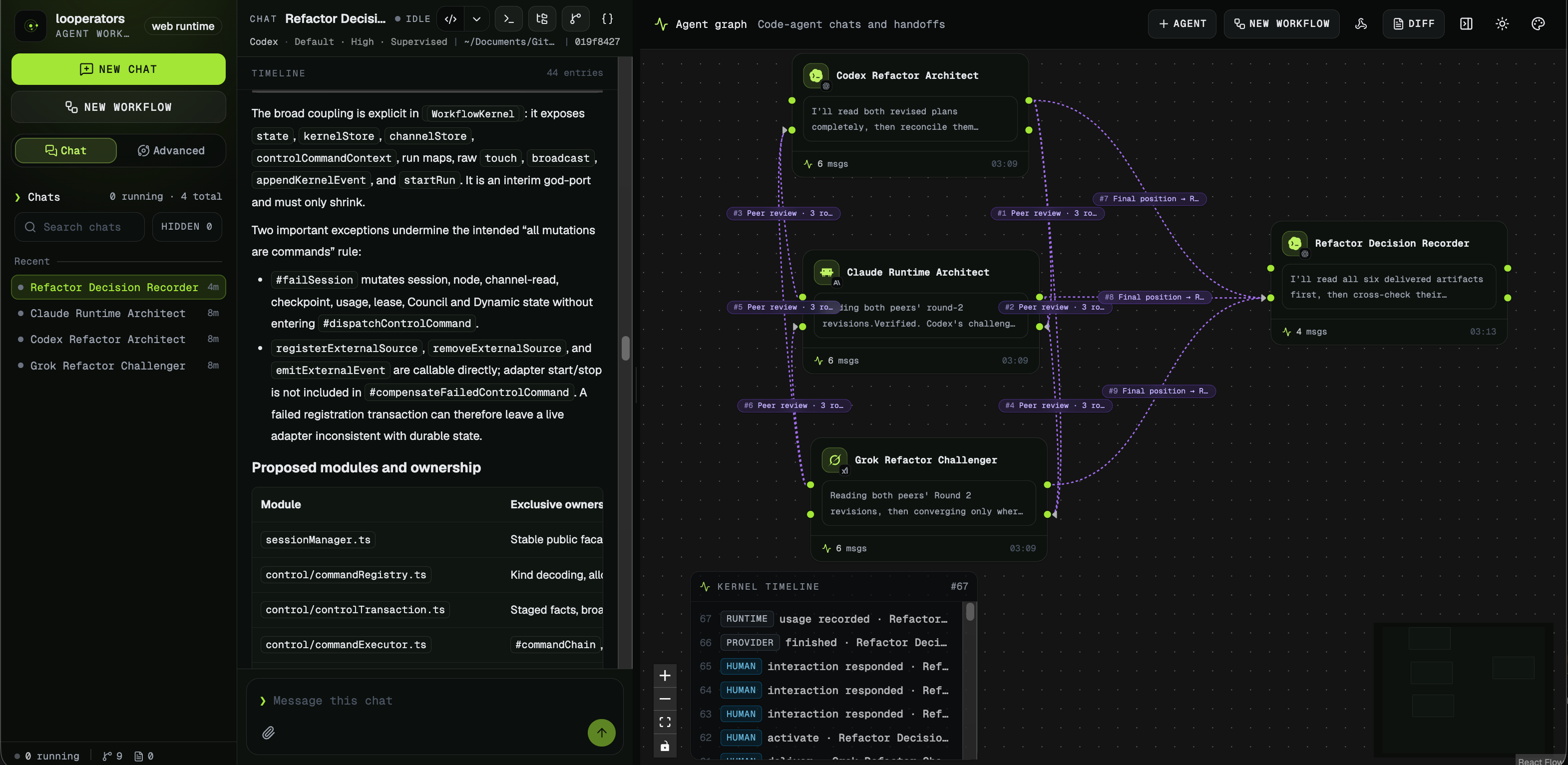
What makes it stand out: a natural-language request can become an editable graph where one agent's answer triggers the next, feedback returns upstream, and a stop condition ends the run. That removes the “human middleware” work of copying context between agents and deciding when another round is needed. Every node remains a real session you can open and steer while the workflow runs.
Best for: Codex ↔ Claude Code review loops, multi-model architecture discussions, and teams that already have agent CLI access but need repeatable coordination. The prebuilt app currently targets macOS Apple Silicon; other platforms can run the Apache-2.0 project from source.
Here Codex, Claude Code, and Grok Build review the same refactor from different angles before a final recorder consolidates the decision.
3. Cursor: Best AI-native IDE for codebase work
Cursor remains one of the best general vibe coding environments because it combines familiar VS Code ergonomics with strong multi-file editing and agent workflows.
What makes it stand out: Composer, strong codebase context, and now long-running agents that offload bigger jobs to remote execution environments.
Best for: full-stack developers, product engineers, and teams that want an AI-first editor without giving up a normal IDE workflow.
4. Claude Code: Best terminal agent for serious repo work
Claude Code is still one of the best choices when you want the agent close to your shell, your tests, and your actual project structure.
What makes it stand out: strong reasoning on large codebases, a terminal-native UX, and a better story for trusted automation thanks to Auto-Accept Mode, headless usage, and the broader Anthropic agent stack.
Best for: engineers who already live in the terminal, large repositories, refactors, and multi-step implementation tasks.
5. Codex: Best OpenAI coding agent for parallel desktop workflows
Codex has become more relevant because OpenAI is clearly pushing it beyond a simple command runner.
What makes it stand out: the desktop app, support for multiple simultaneous coding agents, Windows availability, and the fact that GPT-5.4 is now the flagship model for long-context professional work.
Best for: developers who want an OpenAI-native agent workflow, parallel task execution, and strong long-context support.
6. GitHub Copilot: Best default choice for GitHub-heavy teams
Copilot is still the easiest path when your workflow already lives inside GitHub and mainstream IDEs.
What makes it stand out: broad IDE support, strong GitHub integration, and the lowest switching cost for teams that want AI assistance without adopting a new platform first.
Best for: teams with existing GitHub workflows, code review-heavy environments, and developers who want AI without changing tools.
7. Replit Agent: Best no-setup full-stack builder
Replit Agent is still one of the fastest ways to go from prompt to deployed web app in the browser.
What makes it stand out: full-stack generation plus hosting inside the same environment.
Best for: non-developers, founders, and quick MVPs where speed matters more than architecture purity.
8. Lovable: Best for polished AI-generated web apps
Lovable is a stronger fit than most browser builders when the quality of the UI matters almost as much as the functionality.
What makes it stand out: better visual polish, strong React output, and a workflow that feels closer to product design than raw code generation.
Best for: PMs, founders, and designers creating customer-facing web products.
9. Bolt.new: Best for instant browser execution
Bolt.new remains one of the fastest tools from prompt to running web app because it executes inside a browser-based environment built around WebContainers.
What makes it stand out: it gets you to a working preview quickly and is especially useful for fast frontend experiments.
Best for: prototyping, hackathon builds, and short-cycle frontend iteration.
10. Windsurf: Best dedicated AI IDE alternative to Cursor
Windsurf is still a serious option for developers who want an IDE designed around an agent workflow instead of bolting AI onto an old editor.
What makes it stand out: Cascade and a fluid editing experience that tries to keep you in flow.
Best for: developers who want a dedicated AI IDE with strong action prediction and multi-step assistance.
11. v0 by Vercel: Best UI component generator
v0 is narrower than the others here, but it is still one of the best tools when the job is "generate the frontend component quickly."
What makes it stand out: it is one of the cleanest ways to go from UI idea or mockup to production-grade React code.
Best for: frontend developers, design systems, landing pages, and component-first work.
12. Devin: Best for maximum autonomy, with maximum caution
Devin still represents the high-autonomy end of the market.
What makes it stand out: it aims to handle full tasks end to end inside a more complete development environment than most tools offer.
Best for: teams experimenting with highly autonomous agents and willing to spend more on oversight and review.
13. Gemini 3.1 Pro: Best frontier model for SVG-heavy experimentation
Gemini 3.1 Pro is not a full IDE product in the same sense as Cursor or Claude Code, but it is worth watching because of how much stronger Google is making it for coding and visual generation.
What makes it stand out: better multimodal coding, stronger web-app output, and unusually relevant support for SVG generation and SVG animation ideas.
Best for: visual prototyping, frontend experiments, and workflows where the "output artifact" matters as much as the code.
Comparison Table
| Tool | Best for | Environment advantage | Main trade-off |
|---|---|---|---|
| RunCell (opens in a new tab) | Jupyter analysis | Notebook state + cell execution + live outputs | Narrower than general coding tools |
| looperators (opens in a new tab) | Multi-agent review and debate | Executable graph + real local CLI sessions + stop conditions | Requires supported agent CLIs; prebuilt app is currently Apple Silicon only |
| Cursor | AI-first IDE work | Strong editor UX + long-running agents | Subscription and cloud reliance |
| Claude Code | Terminal repo work | Strong CLI flow + trusted automation | Less visual than IDE-first tools |
| Codex | OpenAI agent workflows | Desktop app + GPT-5.4 + multiple agents | Newer workflow for many teams |
| GitHub Copilot | GitHub-centric teams | Broadest IDE coverage | Less differentiated for deep agent tasks |
| Replit Agent | Browser full-stack builds | Zero setup + deploy in browser | Less control over architecture |
| Lovable | Polished web apps | Better design-oriented output | Narrower than repo tools |
| Bolt.new | Fast browser prototypes | Instant execution and preview | Harder to scale generated code |
| Windsurf | Dedicated AI IDE | Cascade multi-step flow | Smaller ecosystem than VS Code |
| v0 | UI generation | Fast component output | Frontend-only |
| Devin | High autonomy | End-to-end task ambition | High cost and review risk |
How to Choose Without Overbuying
The easiest mistake in this category is paying for overlapping tools.
- If you mainly work in notebooks, start with RunCell and only add a repo-focused agent if you also ship production code outside Jupyter.
- If you already pay for or use several agent CLIs, add looperators when the bottleneck is passing work and feedback between them; it orchestrates those sessions rather than selling you another model wrapper.
- If you mainly work in application code, choose between Cursor, Claude Code, and Codex first. Those are the clearest "daily driver" options for serious engineering work.
- If your goal is mostly fast demos, UI experiments, or founder prototypes, pick Replit Agent, Bolt.new, Lovable, or v0 instead of forcing a repo agent to be a product builder. If your question is less about editor UX and more about how modern personal agents are structured, Hermes Agent vs OpenClaw in 2026 is the better system-level comparison.
- If your use case is specifically visual generation or SVG animation ideas, Gemini 3.1 Pro or RunCell (opens in a new tab) is a more direct path than a general code agent.
Benefits, Risks, and Practical Advice
Vibe coding is already useful, but the quality gap between tools shows up fast when tasks get real.
Benefits
- Faster implementation loops for boilerplate, refactors, UI drafts, and repeated analysis tasks
- Lower barrier for non-specialists who know the problem but not every syntax detail
- Better iteration speed when the tool can observe runtime results, not just source files
Risks
- AI-generated code still needs review, tests, and security checks
- Long-running agents are helpful, but they can drift if the task is underspecified
- A model can be strong while the product around it is still weak for your workflow
Best practices
- Use the tool that matches the runtime, not just the model leaderboard.
- Ask the agent to explain its plan before fully autonomous execution on high-risk tasks.
- Keep version control and tests in the loop.
- For data work, prefer a notebook-native agent over copying snippets back and forth.
Related Guides
- Parallel Code Agents: Worktrees, Sandboxes, and Loop Orchestration
- Best AI Coding Tools in 2026
- Cursor vs Copilot
- Codex vs Claude Code: Skills and Workflow Differences
- Hermes Agent vs OpenClaw in 2026
- AI Agent Turns Jupyter Notebook Into a Data Science Co-Pilot
- Top 10 Data Science Notebooks
FAQ
What is vibe coding?
Vibe coding is a way of building software by describing intent in natural language and letting an AI system generate or modify code for you. The best tools go beyond code generation and can plan, execute, and refine work inside the right environment.
What is the best vibe coding tool in 2026?
There is no single winner for every workflow. Cursor, Claude Code, and Codex are leading choices for general engineering work. For Jupyter notebooks and live data analysis, RunCell is the strongest fit because it works inside the notebook runtime. When several existing agents need to review or debate in a repeatable loop, looperators is the relevant orchestration layer.
Why is RunCell better for data science than a general code agent?
Because it is Jupyter-native. RunCell can inspect notebook state, create and execute cells, react to outputs, and continue the analysis loop in place. General code agents usually stop at code generation or require manual copy-paste back into the notebook.
What changed in 2026 for vibe coding tools?
The biggest changes were Cursor's long-running agents, Anthropic's stronger automation story around Claude Code plus computer use, OpenAI's Codex desktop momentum with GPT-5.4, and Google's Gemini 3.1 Pro becoming more relevant for code-based visuals and SVG generation.
Can vibe coding tools be used for production work?
Yes, but only with review. You still need tests, code review, and security checks. The safer pattern is to use AI for speed and humans for validation.
What should I use for SVGs and animated visuals?
If you specifically want SVGs or SVG animation concepts, Gemini 3.1 Pro is now more relevant than older coding models. If that is your main use case rather than general software engineering, RunCell is the more direct tool when the work belongs inside a notebook rather than a general-purpose coding agent.